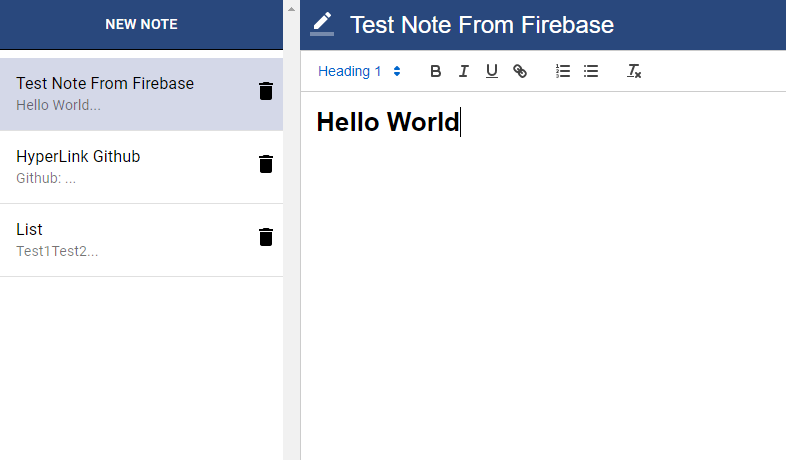
What is this app?
This is an interemediate React.js project that I worked on in order to learn how to implement text editors to apps and to become familar with Googles Firebase.
The application is based off of a popular app called Evernote. It has CRUD functionality implemented to allows users to create, read, update, and delete notes. Firebase was used to save notes to a database. When users reload the page, they will see all of the notes that were created previously.
React was used for the front-end framework of this app. Materialize was used for a modern responsive CSS framework. React Quill was used to implement a powerful rich text editor for notes. Firebase was used for the app's backend, storing each note to a database.
Materialize
Materialize is a CSS framework that lets you implement modern looking elements and components to a project.
Within this project, I used a variety of the features provided by Materialize including the icons that are seen (trashcan and pencil), to provide a clean design for the app.
Quill

In order to implement an editor to the app, I imported React-quill which is a free, open source WYSIWYG editor that can be completely customized depending on the project's needs.
Editor.js
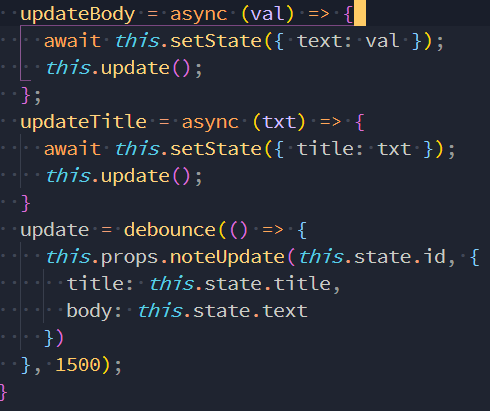
In order to implement Quill I created a file named Editor.js. The image above shows the most important aspects of this file which are 3 arrow functions for updating the body and title that is inputted by the user.
Async and await are used in the app to run asynchronous code, which lets functions execute while still allowing users to do other things within the app itself, as apposed to synchronous code where each function must be completed before the next can be executed. The async function is paused until the promise is resolved.
Firebase
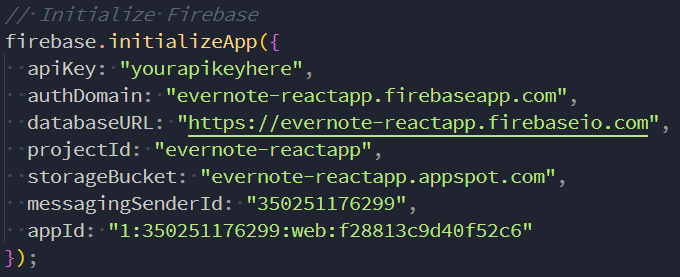
Within the Index.js file, I initialized firebase using the code above. When you setup your firebase project you are given this piece of code that must be put in your Index.js file in order to use firebase as your backend. An api key is needed from firebase for this functionality to work.
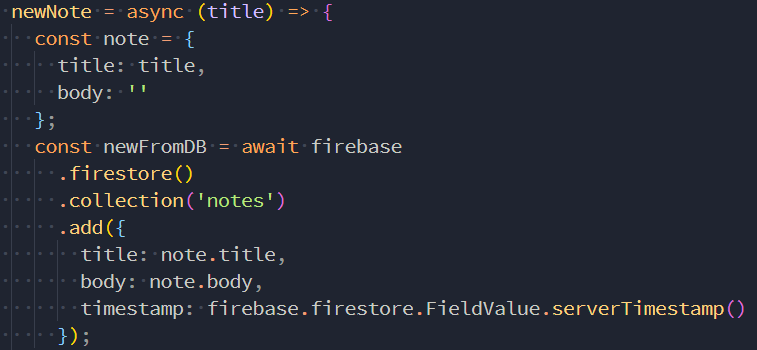
Within the App.js file are multiple arrow functions such as the one above, that allow for notes to be created, updated, or deleted and then saved in the firebase database. This specific function in the image is to create a new note in the database. Firebase will store the title, body, and timestamp for each note that is created by a user. The timestamp shows the date and time each note was created.
Debouncing
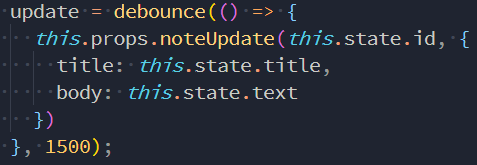
The keyword debounce is very useful for limiting the rate at which functions are executed, improving the browsers performance. Debouncing was a new concept that I learned, helping reduce the slow down of apps was a unique and important lesson to learn for creating high performance apps.
Within the App.js file there is an update arrow function that utalizes this debounce keyword. This functions is used to send the title and body within a prop to update a note. At the end there is a wait of 1500 milliseconds (1.5 seconds) so that firebase, the backend, does not update user inputs after each input, but rather after the user pauses for a brief moment. This helps reduce the load that is sent to the backend.
Conclusion
This project helped me further improve my react skills and taught me how to implement firebase to use it as a backend for apps. I also learned how to use async and await as well as debouncing keywords to help improve the performance of the app. The app was a challenge to make but I was satisfied with the end result.
Some issues that I faced included figuring out how to stop the firebase database from updated constantly as well as learning how to implement the text editor Quill. This was the first time I have ever tried to implement a text editor in an app and it took some documentation reading in order to get it working as intended. As for debouncing, I have never heard of this keyword before as I'm still relatively new to react but it was important to learn how to improve app performance by slowing down the rate at which functions are executed. Overall, this was a challenging yet rewarding project and it taught me many valuable skills.
Thanks for reading!